7 ways to secure your browser
- security
Internet browsers like Microsoft Internet Explorer, Mozilla Firefox, and Apple Safari are practically universally available nowadays. It is crucial to configure web browsers securely because of how frequently they are used. Most of the time, the default configuration of the web browser that ships with an operating system is not safe. Failure to protect your online browser can quickly lead to a variety of computer problems, ranging from spyware being installed without your knowledge to unauthorized users seizing control of your system.
It's critical to comprehend how your web browser works and what functions are available. It may be less secure to enable some web browser functions. In order to enhance the user experience, vendors frequently activate functionality by default; nevertheless, these functions may ultimately put the machine at risk.
Verify the legitimacy of the website
Although it may seem apparent, make sure the URL is right before signing into any online accounts. When visiting new websites, keep an eye out for common warning indications that they can be harmful, such as pop-ups, redirects, on-site spam, and browser warnings.
check a website using a tool:
Browser malware should be avoided
Spyware, miners, browser hijackers, adware, malicious redirection, and other threats can infect your system or browser. Most of the time, staying safe is as simple as ignoring pop-ups, being cautious about what you click, and avoiding websites that your browser flags as potentially harmful. The following are typical indicators of browser malware: a changed default search engine or homepage, toolbars, strange extensions or icons, a large increase in advertisements, errors, and noticeably slower-than-normal page loading. This article will explain How to remove malware from a PC or a Mac.
Ensure Your Browser Respects Your Privacy
I recommend using neither Safari, Edge, nor Google Chrome, you can use it but make sure the configuration is correct. Brave browsers protect your privacy and are safe. Both are quick, open source, easy to use, and compatible with all major operating systems, and I personally use it. Firefox needs certain adjustments to obtain the highest level of security, for instance, arkenfox/user.js.
See more: Privacy Browsers
Block Ads
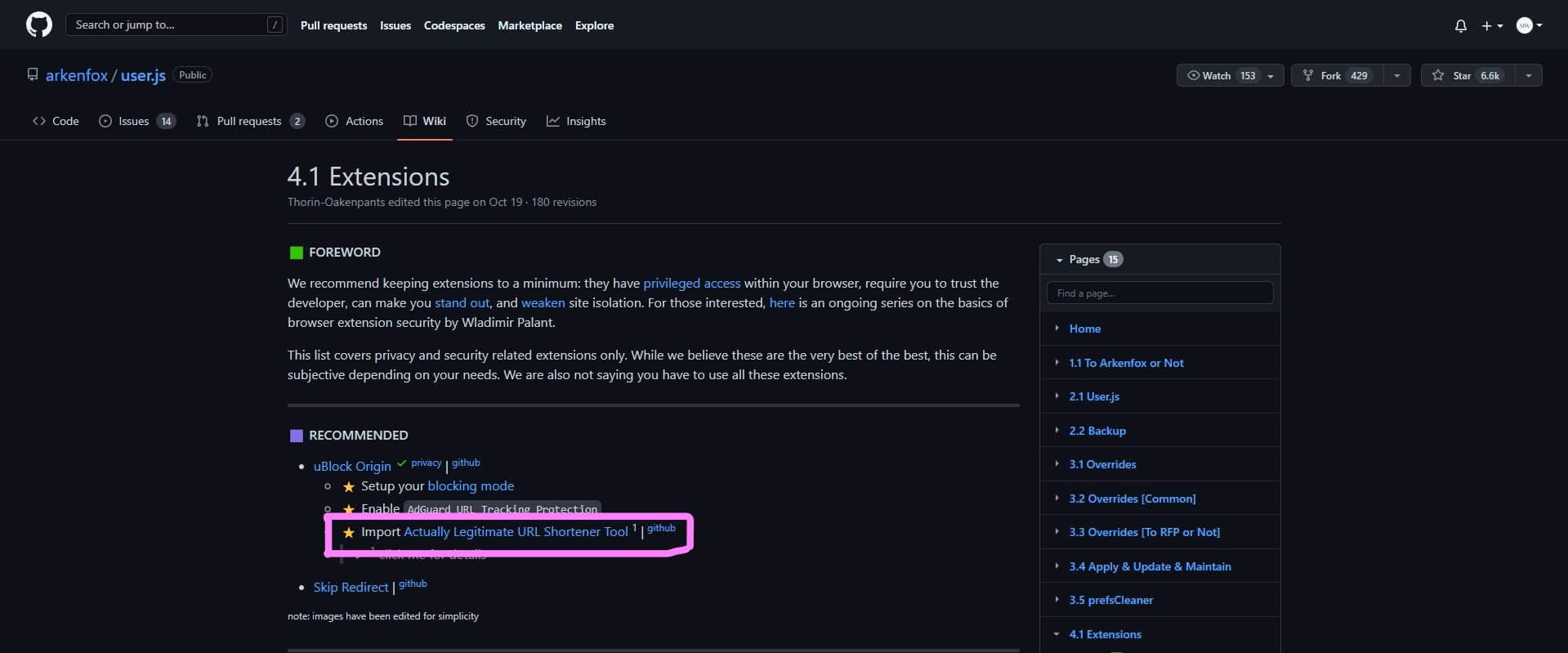
By preventing trackers from being implemented by adverts, using an ad-blocker can help you increase your privacy. Raymond Hill created the very effective and free browser extension known as uBlock Origin. You have to apply some changes to it, all you have to do is to open Extensions, open the following link, and copy its page link.
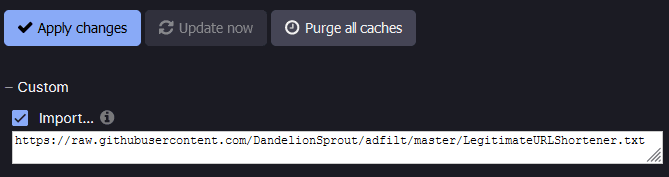
The next step is to check Import in Options > Filter Lists > Custom for uBlock Origin, then paste the URL you copied in
Check for HTTPS
HTTPS stops websites from broadcasting their information in a way that anyone spying on the network may easily view. The information delivered via plain HTTP is broken down into data packets that can be easily requested with the help of free software.
Don't allow the green padlock to fool you into thinking a website is authentic or trustworthy just because it has an SSL certificate. We use HTTPS-Everywhere to automatically enable HTTPS on websites.
Control cookies
You may help prevent websites from monitoring you by frequently deleting your cookies. Your session token may also be stored in cookies and, if stolen, will enable unauthorized access to your accounts. You can find out How to Clear the Cache and Cookies in Your Web Browser.
I recommend clearing cookies and site data when all windows are closed and saving important cookies such as https://accounts.google.com.
Block Third-Party Trackers and Cookies
Third-party cookies, are cookies that a website other than the one you're on has set on your device. you can find out How To Block Third-Party Cookies In Web Browsers.
Blocking trackers will assist in preventing websites, marketers, analytics, and other third parties from secretly watching you.
Blocking trackers tools: